20% Off EasyUEFI Coupon & Review 2026
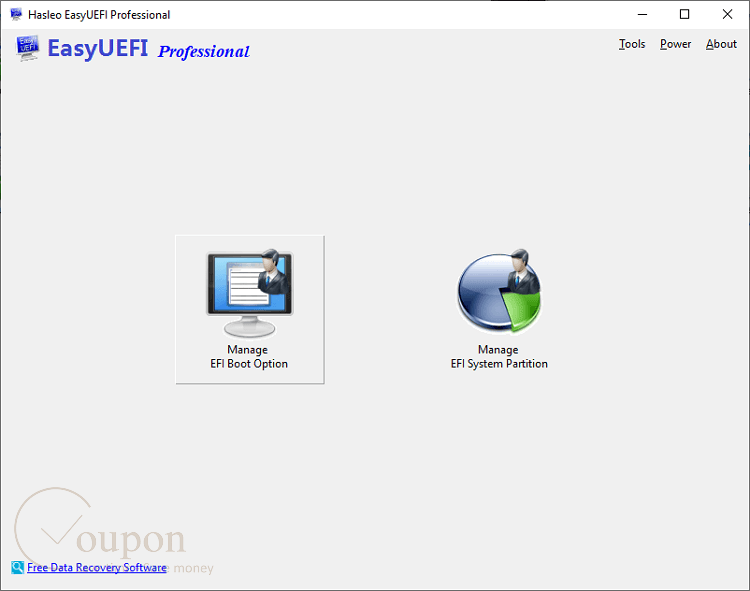
EasyUEFI Professional is a Windows utility for managing EFI/UEFI boot options and EFI System Partitions (ESP). It allows users to create, delete, edit, back up, and restore UEFI boot entries, as well as manage ESPs directly from Windows.

EasyUEFI Professional Coupon Code
Unlock the power of EasyUEFI Professional software, the essential tool for managing your EFI/UEFI boot options. Now, with our exclusive 20% off coupon code, it’s more accessible than ever to enhance your system’s boot management capabilities.

Table of Contents
How to Use Your Coupon Code
- Click on the “Copy Code” button to go to navigate to the checkout page
- Enter the coupon code at checkout to apply your discount (or you will see your applied discount because we have already embedded the coupon code)
- Enter billing information and select payment options to place an order.
- Enjoy!

Why should you choose EasyUEFI Professional?
EasyUEFI Professional is a comprehensive and strong solution designed to simplify the boot process. It offers robust features including the ability to create, delete, edit, and restore EFI/UEFI boot options directly from Windows, without needing to access BIOS settings. It also enables users to fix EFI boot issues or repair EFI system partitions, such as missing or corrupt EFI boot options, missing or corrupt EFI System Partition.
Key Features
- Create, delete, edit, clean up, and back up EFI/UEFI boot options directly from Windows
- Change EFI/UEFI boot sequence and specify a one-time boot entry for the next restart
- Manage, back up, restore, rebuild, and move EFI System Partitions (ESP) between drives
- Generate Windows PE emergency disks for boot repair and recovery
- Manage BCD (Boot Configuration Data) boot options
- Command line support for advanced automation and scripting
- Visual overview of boot entries and partitions with a user-friendly interface
- Support for both Windows PC and Windows Server operating systems
- No upgrade prompts and free lifetime upgrades included
Pricing and Subscription Plans
| Edition | Regular Price (USD) | Discounted Price (USD) | License Scope |
|---|---|---|---|
| Professional – 2 PCs | $29.95 | $23.96 | 2 PCs (single user) |
| Professional – 2 PCs + Lifetime Free Upgrades | $44.95 | $35.96 | 2 PCs (single user) |
Free Trial & Money-Back Guarantee
- Free Trial: A trial version is available for download, allowing users to test the software before purchase. The trial period is typically 15 days, but may expire sooner if system time changes are detected.
- Money-Back Guarantee: Hasleo Software offers a 30-day money-back guarantee. Refunds are granted only under accepted circumstances (e.g., technical issues that cannot be resolved). After a refund, the license key is deactivated and must be uninstalled.
Auto-Renewal & Cancellation
- Auto-Renewal: The standard purchase is a one-time payment for a perpetual license. There is no auto-renewal or recurring subscription for EasyUEFI Professional.
- Cancellation: Since there is no subscription or auto-renewal, cancellation is not required. If you need a refund within 30 days, contact Hasleo support with details and, if approved, uninstall the software.
Discount Coupon Codes
- Verified coupon codes are available, offering up to 20% off on certain plans.
- These coupon codes are time-limited and may change, so check the provider’s site for the latest offers.
Frequently Asked Questions
How do I install and register EasyUEFI Professional?
Download the installer from the official website, run the setup, and follow the prompts. After installation, launch the software and enter your license key to register.
What operating systems are supported?
EasyUEFI Professional supports (U)EFI-based Windows systems, including Windows 11, 10, 8.1, 8, 7, and Windows Server editions.
How do I create or edit a UEFI boot entry?
Open EasyUEFI, select the boot management option, and use the interface to add, edit, or remove boot entries. Changes are applied instantly without needing to reboot into BIOS.
How do I back up or restore the EFI System Partition (ESP)?
Use the “Manage EFI System Partition” feature to back up, restore, rebuild, or move the ESP between drives. This helps safeguard against boot failures.
What should I do if I see multiple “Windows Boot Manager” entries?
Multiple entries can appear if the boot order is changed frequently or after OS installations. You can remove unnecessary entries using EasyUEFI’s cleanup and edit features.
What is the refund or money-back guarantee policy?
EasyUEFI Professional comes with a 30-day money-back guarantee if technical issues cannot be resolved. Contact support for refund requests.
Are there any discount coupon codes available, such as from Tickcoupon?
Yes, you can use a 20% off coupon code from Tickcoupon (and similar sites) to save on your EasyUEFI Professional purchase. Enter the code during checkout to apply the discount. These codes are updated regularly; check Tickcoupon for the latest offers.
Technical Specifications
| Requirement | Details |
|---|---|
| Operating System | Windows 11, 10, 8.1, 8, 7, Vista (32-bit & 64-bit); Windows Server 2022, 2019, 2016, 2012 (R2), 2008 (R2) |
| Processor | 1 GHz or faster (Intel Pentium 4 or later recommended) |
| RAM | 512 MB minimum (2 GB or more recommended) |
| Disk Space | 50–100 MB of free space |
| Internet | Required for product activation, updates, and downloading WinPE components |
| Languages Supported | Multi-language support (global accessibility) |
| Installation Type | Standard Windows installer (EXE setup) |