90% Off iTop Screen Recorder PRO Coupon Code & Review
iTop Screen Recorder is a lightweight, easy-to-use tool that lets you record your screen, webcam, and audio simultaneously. Perfect for tutorials, gameplay, and meetings.

iTop Screen Recorder PRO Coupon Codes Oct 2026
Do you want to spend less on iTop Screen Recorder? Enter this special iTop Screen Recorder PRO coupon code at checkout to save 90% on iTop Screen Recorder PRO(1 Year / 1PC).


Table of Contents
What is iTop Screen Recorder?
iTop Screen Recorder is a program that allows you to record your PC screen in high quality. It allows you to record any part of your screen for an endless amount of time. You will be able to record high-definition videos without a watermark. Highlight the screen for playback whenever you need recorded information, such as video clips, conference minutes, online lectures, or games. iTop Screen Recorder is always ready to serve you as a one-stop shop.
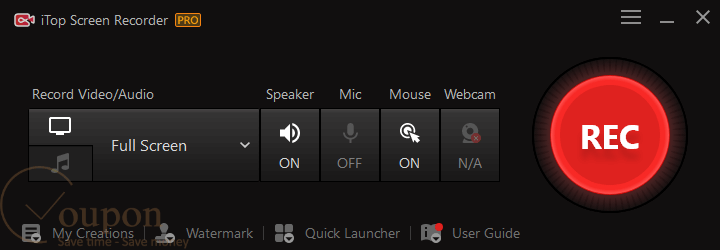
Furthermore, it is committed to meeting all the requirements of screen recording software. Because it features optimisation techniques that allow seamless recording, this software has a superior capacity to record without lag. It enables users to capture a screenshot while recording a video, creating a thumbnail or video snapshot.
Key Features
- Record full screen, selected area, specific window, webcam, audio, or gameplay.
- High-quality video capture: Supports 4K/1080p resolution at up to 120fps for smooth, lag-free recordings.
- Capture system audio, microphone input, and webcam video together or separately.
- Edit recordings with tools for trimming, splitting, merging, adding effects, text, subtitles, and stickers.
- Highlight important content with arrows, shapes, text, magnifier, and spotlight.
- Apply 10+ voice filters and reduce background noise for professional audio quality.
- Blur, remove, or replace webcam backgrounds for privacy and visual appeal.
- Optimized for recording gameplay with hardware acceleration, supporting NVIDIA, AMD, and Intel GPUs.
- Display and scroll script lines during recording for presentations and tutorials.
- Take screenshots of any area or full screen in JPEG, PNG, or BMP format.
- Reduce file size without quality loss using built-in compressor.
- Record and export videos without watermarks.
- Record iOS and Android device screens on PC.
- Set up automatic start and stop times for unattended captures.
Pricing and Plans
Pricing & subscription Options
- 1 Month/ 1 PC: Just $11.99 after using coupon code (Originally $35.99)
- 1 year/ 1 PC: ONLY $20.99 after using coupon code (Originally $177.99)
- 1 year/ 3 PCs: ONLY $29.39 after using coupon code (Originally $279.99)
Free trial and money-back guarantee policy
- Free Trial: iTop Screen Recorder provides a free version for users to test basic functionality before purchasing.
- Money-Back Guarantee: There is a 30-day full money-back guarantee for subscription plans (monthly, semi-annual, annual) and a 60-day guarantee for one-time charge plans. Refund requests must be submitted within the guarantee period.
Auto-renewal and how to cancel
- Auto-Renewal: Subscriptions are typically set to auto-renew by default.
- How to Cancel: Go to the “Manage your iTop” tab on the iTop SaaS support portal. Find the “Subscription and billing” category, view your subscription details, and click “Cancel Subscription.” Confirm your cancellation. Your access continues until the end of the current billing period.
Discount coupon code
- Tickcoupon: Tickcoupon regularly provides verified coupon codes for iTop Screen Recorder, offering discounts of up to 90% off various plans.
Frequently Asked Questions
What is iTop Screen Recorder PRO?
iTop Screen Recorder PRO is a Windows tool for capturing any screen area, webcam, and audio. It supports 4K/1080p recording, multiple formats, built-in editing, and annotation—perfect for tutorials, gaming, webinars, and more.
Which operating systems does iTop Screen Recorder PRO support?
It supports Windows 11, 10, 8.1, 8, and 7 (64-bit only).
What are the hardware requirements for using iTop Screen Recorder PRO?
You need at least a 1 GHz processor, 2 GB RAM, 1,000 MB free disk space, and a screen resolution of 1024×768 or above
Where can I find a 90% off coupon code for iTop Screen Recorder PRO?
You can get a 90% discount using verified coupon codes from Tickcoupon. Use the code “iTop***0off” at checkout for the best deal.
What recording modes are available in iTop Screen Recorder PRO?
There are four main modes: Screen, Webcam, Audio-only, and Game mode. You can record the full screen, a specific region, or a specific window.
What editing features are included?
The built-in editor allows you to trim, cut, add effects, transitions, text, stickers, and adjust audio. You can also compress videos and add annotations or mouse effects
How do I update iTop Screen Recorder PRO?
PRO users receive automatic updates if the “Update automatically” option is enabled. Free users can update manually from the main menu
Technical Specifications
| Requirement | Details |
|---|---|
| Operating System | Windows 7, 8, 8.1, 10, 11 (64-bit recommended; some versions support 32-bit) |
| Processor | 1 GHz processor or faster (2 GHz or faster recommended) |
| RAM | Minimum 1 GB (2 GB or more recommended) |
| Disk Space | Minimum 50 MB (1,000 MB recommended for optimal performance) |
| Internet | Required for activation, updates, and some features |
| Languages Supported | Multilingual: English, Chinese (Simplified & Traditional), Japanese, Korean, Thai, French, German, Spanish, Portuguese, Russian, and more |
| Installation Type | Offline Installer / Full Standalone Setup |
| Display | Minimum 1024×768 screen resolution |
| License | PRO version requires a valid license code for activation |