Jessie
You can get the Sattva Descreen plug-in for Adobe Photoshop – Home for ONLY $17 by using this golden Sattva Descreen promotion at checkout. This plug-in is perfect for displaying images scanned from printed sources like newspapers, magazines, books, postcards, and more. Don’t miss out on this great deal!
Related Promotion:

Benefits of order:
- Lifetime Plan for Windows/Mac
- The license is used for 1 PC
- 30-day Money Back Guarantee from Mycommerce
- Free support
- 100% Clean and Virus-free
- License code delivered to email immediately
Terms and Conditions
- Validity: Ongoing
- Exclusivity: This offer applies only to new purchases.
- Usage: The coupon code is single-use per customer and must be applied during the transaction.
- Refund Policy: Purchases utilizing this coupon remain eligible for our standard refund policy.
Why should you choose the Sattva Descreen plug-in for Adobe Photoshop?
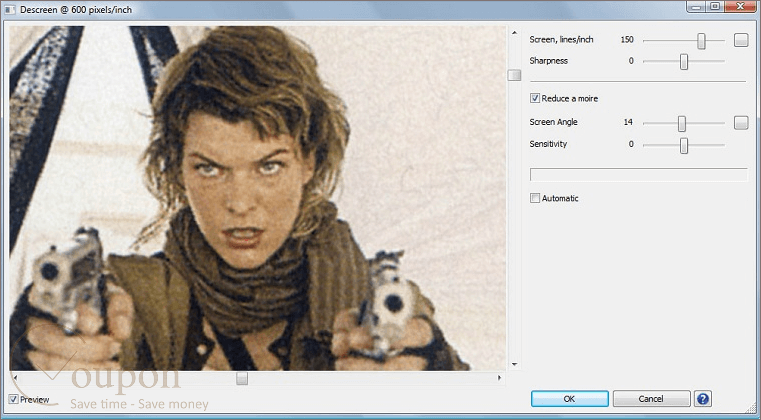
The Sattva Descreen plug-in for Adobe Photoshop is a fantastic tool for enhancing the quality of scanned images from printed materials such as newspapers, magazines, books, and postcards. Unlike standard methods that simply blur images, Sattva Descreen uses advanced Fourier transform technology to detect and remove screen patterns while preserving image details. It works best with scans of 600 to 1200 pixels per inch, ensuring detailed and precise descreening.
Sattva Descreen is available in two editions to suit different user needs. The Professional Edition includes advanced features like noise reduction and tools for manually measuring screen frequency and angles. The Home Edition offers essential descreening functions with a simpler interface and fewer settings. It is fully compatible with various versions of Adobe Photoshop and supports both Windows and macOS operating systems.
Key Features:
- Automatic Screen Detection: The plug-in automatically identifies screen patterns using Fourier transform, eliminating the need for manual adjustments or multiple scanning angles.
- High-Resolution Support: It supports high-resolution scans (typically 600-1200 pixels per inch), ensuring detailed descreening without losing image quality.
- Two Editions:
- Professional Edition: Includes advanced features such as noise reduction, tools for measuring screen frequency and angles, and additional moiré reduction options .
- Home Edition: Simpler to use, ideal for general home scanning needs, and includes basic descreening features.
- Compatibility: The plug-in is compatible with various versions of Adobe Photoshop and supports both Windows and macOS platforms, including the latest macOS updates and Apple M1/M2 processors.
- Multiple Image Formats: Supports various image formats, including 16-bit Grayscale and 48-bit RGB images.
- Batch Processing: Allows batch processing of multiple images, making it efficient for handling large volumes of scanned material.
- Noise Reduction: Available in the Professional Edition, this feature reduces noise in the images, enhancing overall image quality.
In short, the Sattva Descreen plug-in for Adobe Photoshop is an essential tool for professionals and hobbyists who frequently work with scanned images from printed materials.