92% Off Tenorshare ReiBoot for Android Coupon & Review 2026
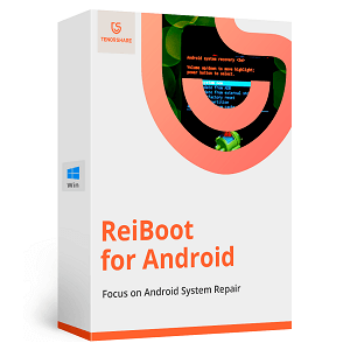
Tenorshare ReiBoot for Android is a professional tool to fix over 50 common Android system issues such as boot loops, black screens, frozen screens, inability to enter or exit recovery/fastboot/download mode, app crashes, and more, without needing technical experience.

Tenorshare ReiBoot for Android Coupon Code
Remember to use the Tenorshare ReiBoot for Android coupon code to buy and enjoy up to 92% off Tenorshare ReiBoot, Android system repair. Don’t miss out!

Table of Contents
What is Tenorshare ReiBoot for Android?
Tenorshare ReiBoot for Android is a powerful and user-friendly system repair tool to resolve a wide range of Android issues without requiring technical expertise. Developed by Tenorshare, a trusted name in mobile recovery solutions, ReiBoot simplifies complex troubleshooting tasks through an intuitive interface and streamlined functionality. It empowers users to fix over 50 common Android system problems, such as devices stuck on the logo screen, boot loops, black screens, and app crashes, without rooting their devices or visiting service centers.
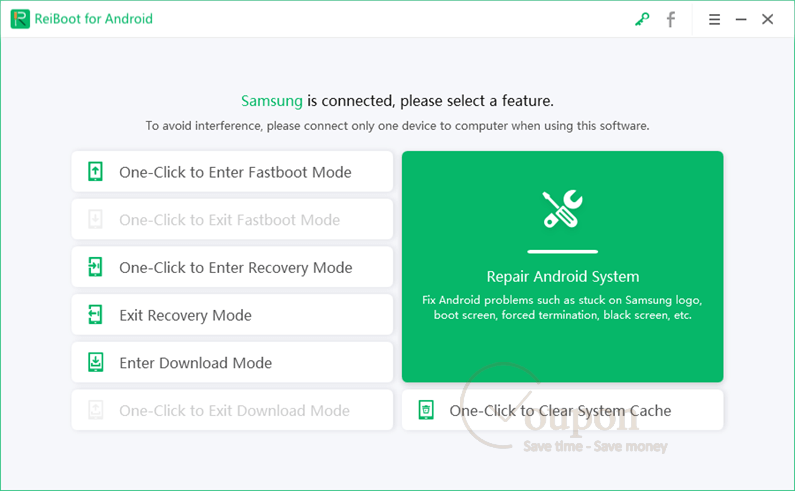
A standout feature of Tenorshare ReiBoot for Android is its ability to enter and exit recovery mode, fastboot mode, and download (Odin) mode with just one click, totally free of charge. For more critical system errors, the Pro version offers advanced repair capabilities, including fixing Android OS-related issues caused by faulty updates, corrupted system files, or crash loops.
Key Features
- One-click entry and exit from recovery mode, fastboot mode, and download (Odin) mode.
- Repair over 50 common Android system issues, including boot loops, stuck on logo, black screens, and unresponsive devices.
- No need to root the device for system repair functions.
- Advanced system repair (Pro version) to fix OS-related issues due to crashes, updates, or corrupted files.
- Supports thousands of Android devices from major brands, including Samsung, Xiaomi, Huawei, OPPO, and more.
- User-friendly interface with clear step-by-step guidance suitable for non-technical users.
- Encourages and assists with data backup before conducting repairs to promote device safety.
- Free basic functions (mode switching) with advanced repairs available via a subscription.
Pricing and Plans
Pricing & subscription Options
| Plan | Regular Price | Discounted Price (with coupon) | Free trial | Auto-renewal | Coupon Codes Available |
|---|---|---|---|---|---|
| 1-Month | $69.95 | $5.47 | Yes | Yes | Yes |
| 1-Year | $99.83 | $10.97 | Yes | Yes | Yes |
| Lifetime | $133.17 | $16.47 | Yes | No | Yes |
Free Trial & Money-Back Guarantee
- Free Trial: New users can access a 7-day free trial with full features.
- Money-Back Guarantee: Purchases are covered by a 30-day money-back guarantee, provided refund criteria are met under the developer’s refund policy.
Auto-Renewal & Cancellation
- Auto-Renewal: Subscriptions are set to auto-renew by default for monthly plans.
- How to Cancel: You can cancel the auto-renewal at any time by contacting Tenorshare’s support team. If you purchased via Google Play, use the Subscriptions section in your Google Play account or contact support. Cancellations should be made before the renewal date to avoid the next billing cycle; payments already made are non-refundable.
Discount Coupon Codes
- Tickcoupon has offered substantial discounts, sometimes up to 92% off, with codes like YH40***.
Frequently Asked Questions
Which Android devices does ReiBoot for Android support?
The software supports over 6000 Android models, including major brands like Samsung, Huawei, Xiaomi, OPPO, OnePlus, LG, Sony, and Motorola. The advanced “Repair Android System” feature currently supports Samsung devices.
Will using ReiBoot for Android cause data loss?
Most features, such as entering/exiting modes, do not affect your data. However, for system repairs (especially deep fixes), there is a risk of data loss. It’s strongly recommended to back up important data before running system repair functions.
Can ReiBoot for Android fix hardware issues?
No. ReiBoot for Android is designed to repair software-related problems only. Hardware issues, such as physical damage, are not fixable with this tool.
How do I use ReiBoot for Android to enter or exit Recovery/Fastboot/Download mode?
You can enter or exit these modes with just one click in the main interface. Follow the onscreen instructions for your specific device model.
What should I do if firmware download or repair fails?
Try downloading again. If the issue persists, contact Tenorshare’s technical support with detailed device information and log files so they can assist you remotely.
Is there a free trial available?
Yes, new users can try ReiBoot for Android for free with limited functionality, mainly mode switching. You’ll need a paid license for full system repair features.
Is there a current valid coupon code for ReiBoot for Android?
Yes! You can get up to 92% off the lifetime license for ReiBoot for Android by using the code YH40*** at checkout, available through Tickcoupon.
Technical Specifications
| Item | Requirement / Details |
|---|---|
| Operating System | Windows 11 / 10 / 8.1 / 8 / 7 (32 & 64 bit), Windows XP / Vista; macOS 15 / 14 / 13 / 12 / 11.5 / 10.15 / 10.14 / 10.13 |
| Processor | 1 GHz (32-bit or 64-bit) or higher |
| RAM | Minimum: 256 MB (1 GB or more recommended) |
| Disk Space | 200 MB or more free space |
| Internet | Required for downloading installation files, product activation, and firmware package downloads during device recovery |
| Languages Supported | English, French, German, Spanish, Japanese, Korean, Arabic, Russian, Portuguese, Italian, Simplified & Traditional Chinese |
| Installation Type | Standalone desktop installer (EXE for Windows, DMG for Mac) |
| Supported Android | Android 2.0 and above; 600+ brands and models (advanced repair features are limited to Samsung devices) |
| Connection | USB connection required between PC/Mac and Android device |
| License | Free trial with limited features; paid for full version |