5% Off A-PDF Page Size Split Coupon Oct 2026 (Verified)
A-PDF Page Size Split is a simple desktop tool that batches split PDFs by page size, efficiently separating mixed-size pages into individual files without requiring Adobe Acrobat Pro.

A-PDF Page Size Split Coupon Code

Table of Contents
How to apply the coupon code?
Copy and paste the coupon code during the checkout process ( or use the checkout link embedded with the coupon code)

A-PDF Page Size Split Intro and Feature
A-PDF Page Size Split is a straightforward desktop tool designed to batch split Acrobat PDF files based on page size. For instance, if a document contains pages of both A4 and A3 sizes, the program automatically separates them into individual files by their page size. It supports predefined ISO paper sizes and allows users to define custom sizes, offering flexible file naming patterns that include page size and count.
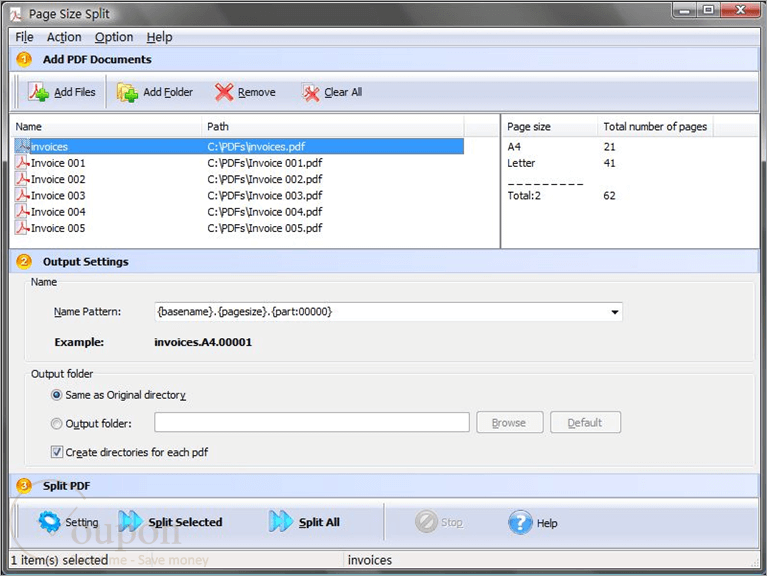
Key features of A-PDF Page Size Split:
- Batch split PDF files based on page size.
- Support predefined ISO paper sizes.
- Allow defining custom page sizes.
- Flexible naming patterns for output files.
- Separate mixed page sizes into individual files.
- Batch processing for efficiency.
- Quick splitting process.
- Does not require Adobe Acrobat Pro.
Refund & Money Back Guarantee Policy
A-PDF offers a 30-day money-back guarantee on all purchases. If you are not satisfied with your purchase, you may request a full refund within 30 days of the purchase date.
Support and Contact
- Tickcoupon Support Team: Please reach out to contact@tickcoupon.com if you can’t use the coupon code/deal/giveaway on the website.
- A-PDF Support Team: Please send your support queries to: https://www.a-pdf.com/contact.htm
Other Special Discounts
- Education/Nonprofit Discount: This brand does not offer EDU/GOV discount.
- Volume Discount: The vendor offers volume discount prices when purchasing 2 licenses or more.
- Giveaways and Free Keys: This brand does not offer giveaways and free keys.
Why Choose Tickcoupon?
- Exclusive Discounts: Get up to 98% off with verified coupon codes.
- Wide Selection: Thousands of software deals across all categories.
- Verified & Updated: Every code is tested and regularly updated.
- Trusted Brands: Partnered with top software developers worldwide.
- Easy to Use: Find, copy, and save with just a click.