30% Off AOMEI Cloner Professional Coupon & Review 2026
AOMEI Cloner Professional is an excellent solution for anyone looking to upgrade their hard drive, safeguard their data, or migrate an operating system to a new SSD.

AOMEI Cloner Professional Coupon Codes Oct 2026
Click on this special AOMEI Cloner Professional coupon code right now to order and receive 30% savings on AOMEI Cloner Professional – 1 Year and Lifetime Upgrades. This is an excellent opportunity for significant savings. Don’t miss it!


Table of Contents
Why choose AOMEI Cloner Professional
AOMEI Cloner Professional is a strong disk cloning software designed to help users migrate data, clone hard drives, upgrade to SSDs, or create full system backups. With just a few clicks, you can move everything—your Windows system, apps, and settings—to a new drive without having to reinstall anything. It offers the option to clone the entire disk or just specific partitions, which is ideal for upgrading your current drive or creating a secure backup.
Users are also allowed to adjust partition sizes during the cloning process to optimise space utilisation on the destination disk, including extending, shrinking, or reallocating unallocated space to existing partitions. Additionally, AOMEI Cloner Professional is capable of performing a complete clone of all sectors on the source disk, including unused and logically defective sectors. This software supports a wide range of drives and connectors, including SATA, mSATA, M.2, PCIe, and U.2.
Key Features
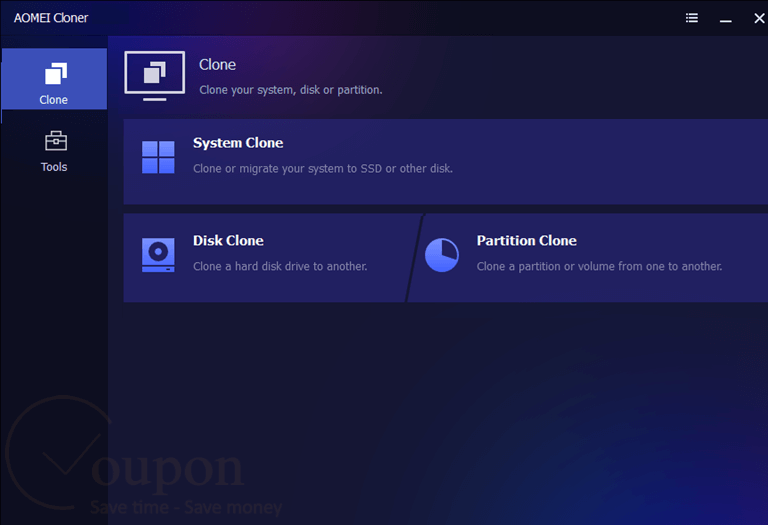
- System Clone: Clone your entire Windows operating system, including boot files and settings, to a new disk without requiring a reinstallation.
- Disk Clone: Clone an entire HDD or SSD to another disk for upgrading or backup purposes. Ideal for migrating data to larger or faster drives.
- Partition Clone: Clone specific partitions or volumes instead of the whole disk—perfect for data transfer or backup.
- Intelligent & Sector-by-Sector Cloning
- Intelligent Clone copies only the used space for faster results.
- Sector-by-Sector Clone replicates every sector, ensuring an exact copy of the source.
- Clone to Smaller Disk: Automatically fits the cloned content to a smaller SSD or HDD when upgrading from a large-capacity drive.
- Hot Clone & Bootable Clone: Clone the system while Windows is running without rebooting (Hot Clone) or create a bootable clone for disaster recovery.
- SSD Alignment: Optimize SSD performance by aligning partitions during the cloning process, extending the lifespan and enhancing speed.
- Support for Dynamic Disks & GPT/UEFI Boot: Clone disks with complex structures like dynamic disks, and fully support cloning between MBR and GPT formats and UEFI boot mode.
- Pre-OS Recovery Environment: Enables users to access AOMEI Cloner before Windows boots, offering rescue options in case of system failure.
Pricing and Plan
Pricing & subscription Options
| Plan Name | Regular Price | Discounted Price (with coupon) | Details |
|---|---|---|---|
| Free Edition | No cost | No cost | Basic disk-clone capabilities; no technical support |
| Professional (Annual) | $39.95 | $27.96 | Full cloning features, free tech support, auto-updates during subscription |
| Professional (Lifetime) | $59.95 | $41.96 | All Pro features for lifetime use, free lifetime upgrades, lifetime tech support |
Free trial and money-back guarantee policy
- Free Trial: The free version acts as a trial with preview and simulation features but does not allow real cloning until licensed.
- Money-Back Guarantee: All paid plans come with a 90-day unconditional money-back guarantee. You can request a full refund within 90 days if unsatisfied, no questions asked.
Auto-Renewal and Cancellation
- Auto-Renewal: The Professional Yearly subscription auto-renews every year by default.
- How to Cancel: You can cancel the subscription anytime before the next billing date to avoid being charged for the following year. Cancellation can be done via your AOMEI user account or by contacting customer support via email ([email protected]). After cancellation, you retain access until the current subscription period ends.
Discount coupon code
- Academic & Non-Profit Discount: AOMEI offers 30% off for students, teachers, and non-profit organizations upon verification of eligibility (e.g., academic email or valid ID). You need to contact AOMEI support to get the coupon code after submitting proof.
- Tickcoupon provides 30% off coupon codes for AOMEI Cloner Professional and related products.
Frequently Asked Questions
What operating systems does AOMEI Cloner support?
It supports Windows 11, 10, 8, 8.1, 7, XP, Vista, and Windows Server versions from 2003 to 2022.
Is there a free version of AOMEI Cloner?
Yes, there is a free edition with basic disk-cloning capabilities, but advanced features and technical support require a paid license.
Does AOMEI Cloner offer a free trial?
Yes, you can use the software in preview (simulation) mode for free. Actual cloning requires a license.
Can I use AOMEI Cloner Professional to clone to SSDs and HDDs of different sizes?
Yes, AOMEI Cloner supports cloning between drives of different sizes, including SSDs and HDDs, using intelligent sector cloning and partition resizing.
Are there any coupon codes for AOMEI Cloner Professional?
Yes, you can use a 30% off coupon code from Tickcoupon for both the annual and lifetime Professional licenses. For example, Tickcoupon often provides codes like AMA***BA30 at 2Checkout.
System Requirements
| Requirement | Details |
|---|---|
| Operating System | Windows 11, 10, 8, 8.1, 7, Vista, XP (all editions, 32-bit & 64-bit); Windows Server 2003, 2008 (R2), 2012 (R2), 2016, 2019, 2022, SBS 2011 |
| Processor | 500 MHz x86 or compatible CPU (minimum) |
| RAM | 256 MB (minimum) |
| Disk Space | 300 MB of available disk space for installation |
| Internet | Required for product activation, updates, and technical support |
| Languages Supported | English, and other major languages (varies by installer version) |
| Installation Type | Standard desktop installer; supports installation on internal drives; creation of bootable rescue media via USB or DVD/CD-RW drive is supported |
| Other Requirements | Mouse or other pointing device (recommended); optional DVD/CD-RW drive or USB stick for creating bootable rescue media |