60% Off Cisdem Video Compressor Coupon & Review 2026
Cisdem Video Compressor is a software tool designed to reduce the size of video and audio files quickly and efficiently, supporting a wide range of formats such as MP4, MKV, AVI, MOV, FLAC, AIFF, and WAV.

Cisdem Video Compressor Coupon Codes Oct 2026
Take advantage of a 60% off coupon for Cisdem Video Compressor and enjoy advanced video and audio compression at a huge discount. This limited-time deal unlocks premium features—batch processing, broad format support, and fast performance—making top-tier media management affordable for everyone.
for Windows:

for Mac:
Table of Contents
What is Cisdem Video Compressor?
Cisdem Video Compressor is a versatile and efficient software solution designed for managing and reducing video and audio file sizes without compromising quality. The software supports a comprehensive range of file formats, including MP4, MKV, AVI, MOV, FLAC, AIFF, and WAV, among others. Users can compress files by setting a target reduction percentage, specifying a desired file size, or custom-tuning parameters such as resolution, encoding format, frame rate, and bitrate using either Variable Bit Rate (VBR) or Constant Bit Rate (CBR) modes.
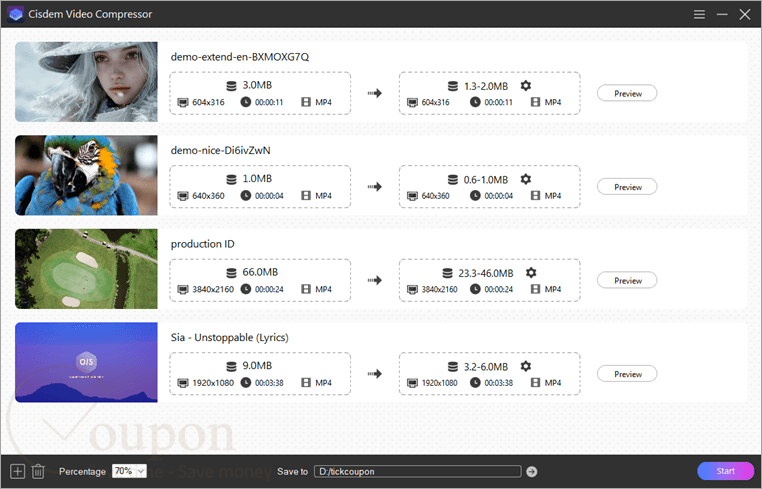
Batch processing accelerates workflows by allowing the simultaneous compression of multiple files, while real-time previews give immediate feedback on compression outcomes before confirming changes. The integration of hardware acceleration—leveraging technologies such as Intel QSV, AMD VCE, and NVIDIA CUDA/NVENC—enables fast and efficient processing, minimizing system resource use even with large files. Additionally, features such as automatic output size estimation, multi-language support, and regular updates that introduce new formats and helpful improvements all work together to make your experience smooth and enjoyable.
Key Features
- Compresses video and audio files with minimal quality loss
- Supports a wide range of formats: MP4, MKV, AVI, MOV, FLAC, AIFF, WAV, and more
- Multiple compression modes: by percentage, target file size, or manual parameter adjustment (codec, resolution, bitrate, frame rate)
- Batch processing for simultaneous compression of multiple files
- Real-time preview of output quality before saving
- Hardware acceleration (Intel QSV, AMD VCE, NVIDIA CUDA/NVENC) for faster performance and efficient resource usage
- Automatic estimation of final output file size
- User-friendly interface with regular updates, multi-language support, and new format integration
- File conversion capability alongside compression functions
Pricing and Subscription
| Plan | Regular Price (USD) | Discounted Price (USD) | Money-Back Guarantee | Auto-Renewal | Coupon Code Available |
| Lifetime/1 PC | $39.99 | $31.99 | 30 days | No | Yes |
| Lifetime/2 PCs | $79.98 | $44.79 | 30 days | No | Yes |
| Lifetime/5 PCs | $199.95 | $79.99 | 30 days | No | Yes |
Free Trial and Money-Back Guarantee
- Free Trial: Yes, a free trial is available for users to test the software before purchase.
- Money-Back Guarantee: A 30-day money-back guarantee is offered, but only for technical issues or if the product does not work as described.
Auto-Renewal and Cancellation
- Auto-Renewal: Not applicable, as the lifetime license is a one-time payment and does not require automatic renewal.
- Cancellation: Since there is no subscription, cancellation is not required. However, refund requests can be made via support within 30 days if there are technical issues or the product does not function as described.
Discount Coupon Codes
- Verified coupon codes are available, offering up to 60% off on specific plans.
- These coupon codes are time-limited and may change, so check the provider’s site for the latest offers.
Frequently Asked Questions
Which formats are supported?
It supports almost all popular video and audio file formats, including but not limited to MP4, MKV, AVI, MOV, FLAC, AIFF, WAV, MP3, and WebM.
How much can I compress a file?
You can generally reduce file sizes by up to 90%, with compression ratios adjustable by percentage, target output size, or advanced settings like bitrate and resolution.
Is there quality loss after compression?
Cisdem Video Compressor is designed to minimize quality loss. With options for variable (VBR) and constant bit rate (CBR), you can optimize for smaller files while retaining visual and audio clarity.
What hardware acceleration is available?
It leverages Intel QSV, AMD VCE, and NVIDIA CUDA/NVENC for faster processing and efficient resource use.
How can I update to the latest version?
The program may auto-detect updates, or you can manually check for updates in the program menu, or download the latest version from the official website and reinstall.
Where can I get a 60% off coupon code?
You can find verified discount codes—including up to 60% off—on Tickcoupon and similar coupon sites. Look for active offers for Cisdem Video Compressor specifically, as deals may vary over time.
System Requirements
| Item | Windows | Mac |
|---|---|---|
| Operating System | Windows 11, 10, 8.1, 8, 7 | macOS 10.13 (High Sierra) or later |
| Processor | 1 GHz minimum (2.4 GHz recommended) | Intel or Apple Silicon processor |
| RAM | 2 GB (4 GB or more recommended) | 512 MB or more |
| Disk Space | 200 MB free space recommended | 100 MB or more free space |
| Internet | Required for download, updates, and activation | Required for download, updates, and activation |
| Languages Supported | Multilanguage | Multilanguage |
| Installation Type | Standalone offline installer | Standalone offline installer |