61% Off Cisdem Window Manager for Mac Coupon & Review
Cisdem Window Manager for Mac is a productivity tool that helps Mac users organize, resize, and snap application windows into preset positions or custom layouts using an intuitive drag-and-drop grid system or keyboard shortcuts.

Cisdem Window Manager for Mac Coupon Codes
Make sure to click on this Cisdem Window Manager coupon code for Cisdem Window Manager for Mac to enjoy a 61% discount off the listed price!

Table of Contents
What is Cisdem Window Manager for Mac?
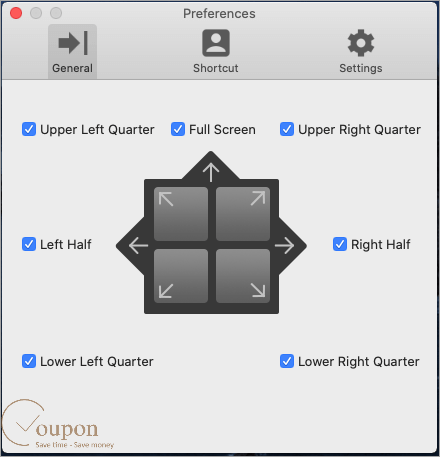
Cisdem Window Manager for Mac is a reliable and professional align and split-screen for Mac users. It was designed to make it easier for users to resize windows by dragging them to corners or edges. Additionally, you can adjust the window layout with the built-in grid system to select the area where windows will appear. The next feature of the program allows users to create shortcuts to move multiple windows. Cisdem Window Manager won’t cause your Mac to lag because it requires very little memory and virtually no CPU. It works on all versions of macOS 10.10 or later.
Key Features
- Resize windows when dragging to edges or corners
- Adjust window layout with grid system
- Create keyboard shortcuts to move between windows
- Show or hide the Window Manager icon in the menu bar
- Restore the old window size if the window is dragged away
- Use a global keyboard shortcut to open Preferences or disable Window Manager
- Support for all standard windowed applications, such as Safari, Chrome, Pages, Keynote, et
- Light and easy.
Pricing and Plans
| Plan | Regular Price (USD) | Discounted Price (USD) | Money-Back Guarantee | Auto-Renewal | Discount Codes Available |
| Lifetime/ 1 Mac | $9.99 | $6.99 | 30 days | No | Yes |
| Lifetime/ 2 Macs | $19.98 | $10.49 | 30 days | No | Yes |
| Lifetime/ 5 Macs | $49.95 | $19.59 | 30 days | No | Yes |
Free Trial & Money-Back Guarantee
- Free Trial: A free trial version is available for download, allowing you to test the software before purchasing.
- Money-Back Guarantee: Cisdem offers a 30-day money-back guarantee. If you encounter a technical issue that Cisdem cannot resolve, you can request a refund within 30 days of purchase.
Auto-Renewal & Cancellation
- No Auto-Renewal: The standard licenses for Cisdem Window Manager for Mac are lifetime, so there is no auto-renewal for these plans.
How to Cancel: Since the purchase is a one-time payment, there is no recurring subscription to cancel. If you purchase through a third-party store with a subscription, cancellation can typically be managed via your account settings on that platform.
Discount Coupon Codes
- Verified coupon codes are available, offering up to 61% off on certain plans.
- These coupon codes are time-limited and may change, so check the provider’s site for the latest offers.
Frequently Asked Questions
How does window snapping work?
You can drag any window to the screen’s edges or corners to automatically resize it into one of seven preset positions: top, left, right, or any of the four corners.
What is the grid system and how do I use it?
The grid system allows you to split your screen into custom sections (from 1×1 up to 10×10). Simply click and drag across the grid to define the exact area and position for your window.
Which Mac applications are supported?
Cisdem Window Manager supports nearly all standard Mac apps, including Safari, Chrome, Pages, and Keynote. Some non-standard or custom windows may not be fully compatible.
How do I activate my license?
After purchase, launch the software, click the key icon, and enter your license code. Make sure to copy and paste the code without extra spaces.
What should I do if the app won’t install or run?
Ensure your macOS version is supported. If problems persist, check for updates or contact Cisdem support for troubleshooting.
Are there any discount coupon codes available?
Yes! Tickcoupon regularly offers up to 61% off with the code TICKCO**OFF. Always check Tickcoupon or similar sites for the latest deals before purchasing.
Technical Specifications
| Requirement | Details |
|---|---|
| Operating System | macOS 10.10 Yosemite or later (compatible with Intel & Apple Silicon) |
| Processor | Intel or Apple Silicon (M1/M2/M3 series) |
| RAM | 512MB or more |
| Disk Space | 50MB free space for installation |
| Internet | Required for download, activation, and updates |
| Languages Supported | English (other languages may be available depending on version) |
| Installation Type | Desktop application (standard Mac installer, drag-and-drop) |