69% Off DWG FastView Coupon & Review 2026
DWG FastView is a cross-platform CAD viewer and editor that supports DWG, DXF, and other popular CAD file formats. It is available for Windows, mobile devices, and web browsers, catering to engineers, architects, and designers for flexible drawing management.

DWG FastView Coupon Codes Oct 2026
Click on this DWG FastView coupon code to receive an 69% promotion for DWG FastView Premium, Super and Pro plans. Don’t miss your chance!
Related Promotion:
DWG FastView Premium:

DWG FastView Super:
DWG FastView Pro:
Table of Contents
What is DWG FastView?
DWG FastView is a cross-platform CAD solution designed to simplify the viewing, editing, and sharing of 2D and 3D drawings. With its help, users can access and manage their CAD files from Windows desktops, web browsers, and mobile devices using a single account. It also offers a set of editing tasks, such as drawing lines, circles, arcs, or adding text, dimensions, and layers directly within the app.
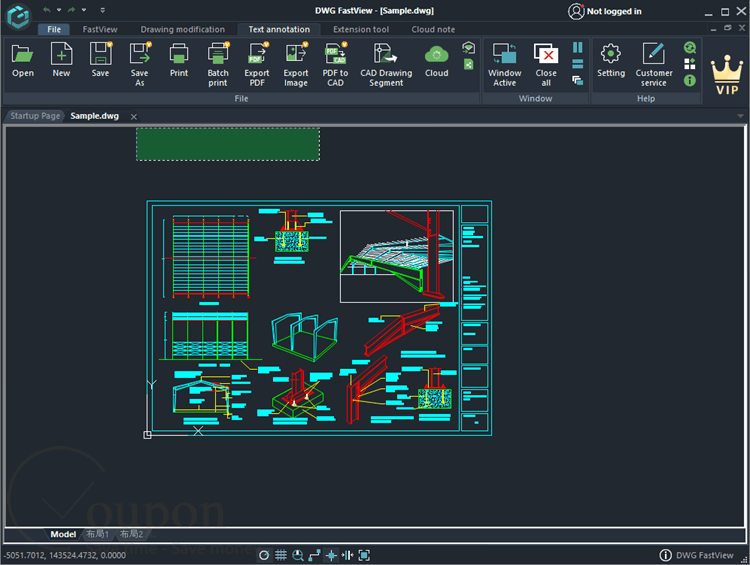
Not to mention, DWG FastView comes with the ability to sync your files via primary cloud services, such as Dropbox, Google Drive, and OneDrive, or use DWG FastView’s cloud for easy collaboration. You are allowed to save and share your drawings in various formats, such as PDF, JPEG, PNG, or BMP, and send them via email or a direct link.
Key Features
- Use DWG FastView on Windows, Android, iOS, and through the web, ensuring seamless access to your projects wherever you are.
- Open and save not only DWG files but also DXF and DWF formats with high compatibility.
- Load large CAD drawings quickly without lag, ensuring a smooth viewing and editing experience.
- Perform precise editing tasks, such as drawing lines, circles, arcs, or adding text, dimensions, and layers, directly within the app.
- Sync your files via major cloud services like Dropbox, Google Drive, and OneDrive, or use DWG FastView’s own cloud for easy collaboration.
- Download and access drawings offline, perfect for fieldwork without internet access.
- Share your drawings securely with teammates or clients via links or email, with customizable access permissions.
- Measure distances, areas, and angles accurately to ensure design precision.
- Print or plot your drawings in batches to save time on repetitive tasks.
- Add comments or markups to make it easier to communicate with your team within the drawing files.
Pricing and Plans
| Plan Type | Regular Price (USD) | Discounted Price (USD) | Free Trial | Money-Back Guarantee | Auto-Renewal | Discount Codes Available |
|---|---|---|---|---|---|---|
| Premium – Yearly | $95.88 | $38.39 | 7 days | 7 days | Yes | Yes |
| Super -Yearly | $179.88 | $55.99 | 7 days | 7 days | Yes | Yes |
| Pro – Yearly | $99.00 | $69.30 | 3 days | 7 days | Yes | Yes |
| Pro -Lifetime | $269.00 | $174.30 | 3 days | 7 days | No | Yes |
Frequently Asked Questions
Is DWG FastView free to use?
Yes, DWG FastView offers a free version with essential viewing, editing, and annotation tools. Advanced features and offline access require a paid subscription.
Is there a free trial for premium features?
New users typically receive a 7-day free trial of premium features. After the trial, limited daily free use is available for basic functions.
What is the refund policy?
DWG FastView offers a 7-day full refund guarantee. Partial refunds may be available for unused periods on monthly (within 15 days) and annual (within 180 days) subscriptions.
How do I apply a discount or coupon code?
At checkout on the official DWG FastView website, enter your coupon code in the provided field before completing payment.
Is there a 69% off coupon code from Tickcoupon?
Yes, Tickcoupon and similar platforms frequently offer codes for up to 69% off (and sometimes higher) on DWG FastView subscriptions. Check Tickcoupon for the latest valid codes and apply them at checkout.
What happens if my premium access disappears?
If your premium access reverts to free, check your subscription status. Payment issues or failed auto-renewals may cause this—re-subscribe and ensure auto-renewal is enabled.
What is the difference between DWG FastView and DWG FastView Pro?
DWG FastView Pro is a separate, more professional solution with a licensing system, designed for businesses and advanced users. Standard DWG FastView uses account-based activation without license keys.
Technical Specifications
| Requirement | Minimum Specification | Recommended Specification |
|---|---|---|
| Operating System | Windows XP SP2 or later, Vista SP1 or later, 7/8/8.1/10 (32/64-bit) | Windows 10 (64-bit) |
| Processor | 1 GHz or faster, 32-bit (x86) or 64-bit (x64) processor | 2 GHz or higher |
| RAM | 1 GB (32-bit), 2 GB (64-bit) | 3 GB (32-bit), 4 GB (64-bit) or higher |
| Disk Space | 1 GB free hard disk space | 3 GB or more |
| Internet | Required for cloud features, updates, and online activation | Broadband recommended |
| Languages Supported | Multiple languages including English (see official site for full list) | Multiple languages |
| Installation Type | Standard Windows installer | – |
| Display | 1024×768 VGA with True Color (minimum) | Higher resolution recommended |