60% Off MacX DVD Ripper Pro Coupon & Review 2026
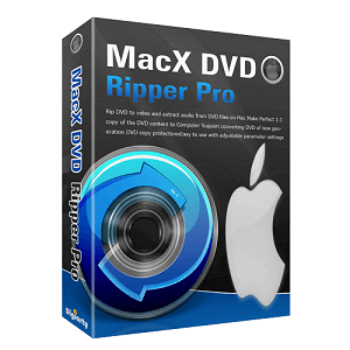
MacX DVD Ripper Pro is a professional DVD ripping software for Mac that allows users to convert both commercial and homemade DVDs to various digital formats, including MP4, MOV, MKV, AVI, and more. It supports over 350 device profiles and can handle copy-protected, damaged, or region-locked discs.

MacX DVD Ripper Pro Coupon Codes Oct 2026
Save 60% on MacX DVD Ripper Pro (Lifetime) immediately by using this MacX DVD Ripper coupon code at checkout. Don’t skip this coupon code to enjoy your discount!

Table of Contents
Why choose MacX DVD Ripper Pro?
MacX DVD Ripper Pro is a high-quality DVD compression software program for Mac computers, enabling users to convert DVDs to popular file formats with optimal picture and sound quality. The software allows ripping DVD data to many popular video and audio formats such as MP4, QT, FLV, H.264, MOV, AVI, MP3, MPEG, M4V and works on applications and devices like QuickTime, Phone 4, iPhone 3GS, iPad/iPad 2 iPod touch 4, iPod classic, Apple TV, PSP, PS3, MP3 player, etc.
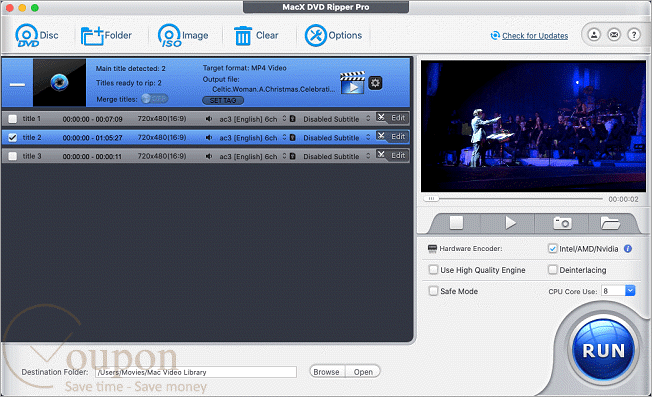
In addition, MacX DVD Ripper Pro helps compress all encrypted DVDs on a Mac computer, iPhone, iPad, iPod, and Android smartphone, allowing you to back up content from discs to single data files that retain the same quality as the original disc. It supports users in ripping content and backing up DVDs at a fast and efficient speed, compatible with many mobile devices, making it easier for you to enjoy them.
Key Features
- Rips both commercial and homemade DVDs, including damaged or copy-protected discs (CSS, region code, Sony ArccOS, Disney X-project, etc.).
- Converts DVDs to a wide range of video and audio formats, including MP4, MOV, MKV, AVI, and HEVC/H.265, H.264, MPEG4, MP3, and more.
- Offers over 350 preset profiles for devices such as iPhone, iPad, Apple TV, Android, PlayStation, and more.
- Provides 1:1 DVD backup to ISO image, MKV, or MPEG2, preserving all video, audio tracks, and subtitles.
- Fast ripping speed with support for multi-core CPUs and Hyper-threading technology.
- Maintains high output quality with a built-in High Quality Engine.
- Allows editing features: trim, crop, merge, add external subtitles, and adjust audio volume.
- Extracts audio tracks and snapshot images from DVDs.
- Adjustable output settings for advanced users: codec, bitrate, frame rate, resolution, audio channel, and more.
- A user-friendly interface suitable for both beginners and experienced users.
- Regular updates to support the latest DVDs and copy protection schemes.
- Enables uploading ripped videos to platforms such as YouTube, Facebook, and Vimeo.
Pricing and Plan
Pricing & subscription Options
Free trial and money-back guarantee policy
- Free Trial: The developer does not advertise a free trial version of MacX DVD Ripper Pro. Some third-party sites may offer limited-time giveaways, but these typically do not include free upgrades or support.
- Money-Back Guarantee: All purchases come with a 30-day money-back guarantee. Refunds are provided if the product cannot function as described and the issue cannot be resolved within a reasonable timeframe. Contact support for refund requests.
Auto-renewal and how to cancel
- Auto-Renewal: The Premium License is a subscription that auto-renews annually at $39.95 after the first year.
- Cancellation: You can cancel your subscription at any time. The developer sends an email notification 7 days before renewal. To cancel, follow the instructions in your order confirmation email or contact their support team. After cancellation, you can continue using the software until the end of your paid period.
Discount coupon code
- Tickcoupon has provided special coupon codes for up to 60% off MacX DVD Ripper Pro. These codes are typically available for a limited time and may require visiting the Tickcoupon giveaway or deal page to obtain the code.
Frequently Asked Questions
Is there a free trial available?
Yes, a free trial is available. The trial version allows you to rip the first five minutes of any DVD. Full functionality is unlocked after purchasing a license.
Can I transfer my license to another Mac?
Yes. Remove the license from your old Mac, uninstall the software, and then install and activate it on your new Mac using your original license code. If you cannot remove the license due to a computer crash, contact support for assistance.
Can MacX DVD Ripper Pro handle copy-protected or region-locked DVDs?
Yes, it supports most copy protection schemes, including CSS, region code, Sony ARccOS, Disney X-project, and more.
What output formats and devices are supported?
The software supports a wide range of video and audio formats (MP4, MOV, MKV, AVI, MP3, etc.) and over 350 device profiles, including iPhone, iPad, Android, PlayStation, and more.
How do I use a coupon code for a discount?
To use a coupon code, copy the code from a reputable coupon site (such as Tickcoupon), enter it during checkout on the official MacX DVD Ripper Pro website, and the discount will be applied to your order.
Is there a 60% off coupon code from Tickcoupon?
As of now, Tickcoupon offers up to 56%–60% off coupon codes for MacX DVD Ripper Pro.