50% Off Mockplus Cloud Coupon & Review 2026
Mockplus Cloud is a cloud-based platform for design collaboration, prototyping, and developer handoff. It centralizes design files, feedback, and project management for teams of all sizes.

Mockplus Cloud Coupon Code
You will have a golden chance to receive up to a 50% discount on Mockplus Cloud Pro – Annually and monthly plans after using this amazing Mockplus Cloud Pro coupon at checkout. Order now!

Table of Contents
What is Mockplus Cloud?
Mockplus Cloud is a cutting-edge, web-based platform crafted to revolutionize the workflow for design teams, product managers, and developers by centralizing every aspect of the design process. At its core, Mockplus Cloud streamlines design collaboration, prototyping, and handoff, serving as a single source of truth where ideas take shape, projects are managed, and communication occurs in real-time.
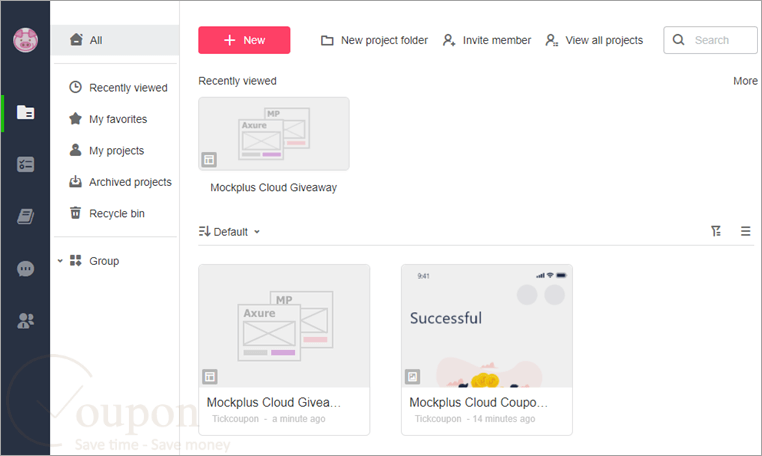
By seamlessly integrating with design mainstays such as Sketch, Figma, Adobe XD, Photoshop, and Axure, Mockplus Cloud enables rapid import, annotation, and management of design files from diverse sources. The platform excels at bridging the gap between design and development with its automated generation of design specs, assets, and code snippets, tailored for different platforms, including Web, iOS, and Android. Mockplus Cloud fosters collaborative synergy via features such as real-time commenting, revision history tracking, and robust project and team management capabilities.
Key Features
- Centralized workspace for design, prototyping, and collaboration
- Seamless import and management of design files from Figma, Sketch, Adobe XD, Photoshop, and Axure
- Auto-generation of design specs, downloadable assets, and code snippets for Web, iOS, and Android
- Real-time commenting, @mentions, notifications, and revision history
- Integrated project and team management with roles, permissions, and batch-edit features
- Unified and shareable design systems and asset libraries across projects
- Drag-and-drop interactive prototyping with realistic device previews (including Apple Watch, car displays)
- Agile task and project management, including built-in PRD and document tools
- Integration with Slack and Jira for streamlined communication
- Cross-platform access, with mobile review via Mockplus Cloud app
- Enhanced annotation features and support for complex user flows
- Secure cloud-based environment, supporting scalable teams and ongoing feature updates
Pricing and Subscription Plans
| Plan | Regular Price (USD) | Discounted Price (USD) | Coupon Codes Available |
|---|---|---|---|
| Free | $0 | $0 | N/A |
| Pro – Monthly | $5.95 | $2.97 | Yes |
| Pro – Yearly | $59.40 | $29.70 | Yes |
Free Trial & Money-Back Guarantee
- Free Trial: A free Basic plan can be activated by simply registering an account. This includes 10 projects and up to 10 users per team.
- After creating a new account, there is a 15-day free trial for a basic team with full access to core features. Post-trial, users retain indefinite access at free plan limits.
- Refunds/Money-Back: Refunds are generally only available within the initial 14 days after purchase. Refunds are not granted for most cases outside this window or for change-of-mind requests. Refunds are processed if auto-renewal occurs without proper notification and the product is not needed.
Auto-Renewal & Cancellation
- Mockplus Cloud subscriptions (monthly/annual) are auto-renewed by default after purchase.
- To cancel:
- Log in to the payment platform (e.g., MyCommerce) using your billing email.
- Navigate to the order overview page, locate the relevant subscription, and use the “Cancel subscription” option.
- After cancellation, you retain access to paid features until the current billing cycle ends; no further charges will occur.
- Further details and guidance for cancellation can be found in the official help section.
Discounts & Coupon Codes
- Mockplus regularly offers promotional discounts, with current codes available across multiple platforms
- Tickcoupon and similar platforms have featured valid deals for up to 50% off recently. Always verify current codes before purchase.
Frequently Asked Questions
Who should use Mockplus Cloud?
It’s designed for UX/UI designers, product managers, developers, and teams needing streamlined workflows for web, mobile, or app projects.
What’s the difference between Mockplus Cloud and Mockplus Classic?
Mockplus Cloud is focused on online, team-based design collaboration and handoff, whereas Mockplus Classic is a desktop tool for individual or small team prototyping.
Is there a free version of Mockplus Cloud?
Yes, there is a Basic plan that’s free for up to 10 users, includes unlimited guests, and lets you manage up to 10 active projects.
Can developers access specs, assets, and code directly?
Yes, developers receive auto-generated specs, assets, and code snippets for web, iOS, and Android, ready for handoff with a single link.
Are there paid plans and what do they cost?
Plans start with a free Basic tier; paid Pro plans are typically priced per user per month, and customized Enterprise solutions are available. Pricing varies and often includes discounts for longer-term commitments.
Technical Specifications
| Requirement | Minimum Specification | Recommended Specification |
|---|---|---|
| Operating System | Windows 7/8/8.1/10/11 (32/64-bit), macOS 10.11 or later | Latest Windows 10/11 or macOS (64-bit) |
| Processor | Dual-core 1 GHz (Intel/AMD), Intel Pentium or newer | Intel Core i3 or above |
| RAM | 2 GB | 4 GB or higher |
| Disk Space | 200 MB for desktop app (for cloud: minimal, depends on cache usage) | 500 MB or more |
| Internet | Required for all features and collaboration | Broadband (5 Mbps+) |
| Languages Supported | English (UI), with support for multiple languages | Multiple languages (check current list) |
| Installation Type | Browser-based (no install), or desktop client installer (Win/Mac) | Browser (latest Chrome, Firefox, Edge, Safari) or desktop app |