40% Off Photoins Photo BG Remover Coupon & Review 2026
Photoins Photo BG Remover is software that uses AI technology to automatically remove and replace backgrounds from photos. It allows users to process images in batches or individually, offering both automatic and manual editing modes for precision and flexibility.

Photoins Photo BG Remover Coupon Codes
Do you want to save 40% on Photoins Photo BG Remover? Simply, you only use this amazing Leawo Photoins Photo BG Remover coupon code to have a price discount of 40% Off. Don’t miss your chance!
For Windows:

For Mac:

Table of Contents
What is Leawo Photoins Photo BG Remover?
Photoins Photo BG Remover by Leawo is a smart, AI-powered tool designed to simplify background removal from photos with speed and precision. The software automatically detects and isolates the subject from even the most complex backgrounds—handling tricky areas like hair or transparent elements with ease. Users can remove or replace backgrounds with solid colors, images, or transparency.
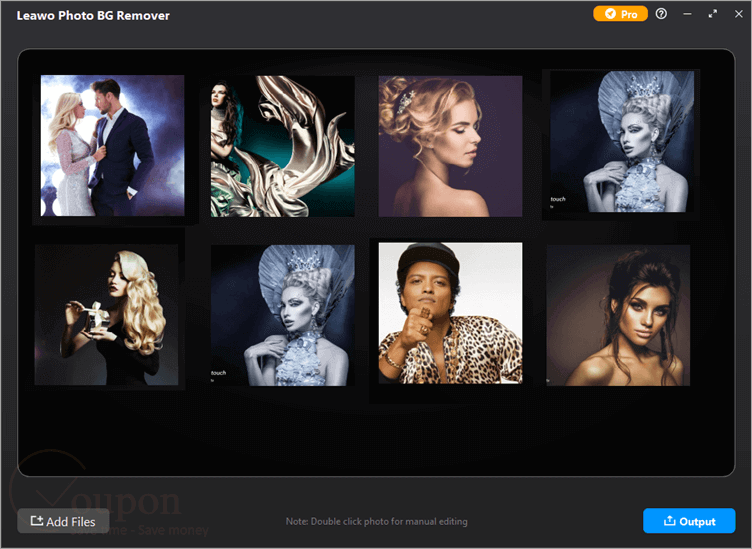
It also supports manual editing tools for fine-tuning, as well as batch processing for bulk image tasks. Beyond background removal, the software includes enhancement features such as skin retouching, eye enlargement, and image upscaling of up to 40×. Available for both Windows and Mac, Photoins Photo BG Remover combines intuitive design with professional-grade results, helping users save time while elevating the quality of their visuals.
Key Features
- Instantly remove backgrounds with intelligent AI detection or switch to manual refinement for challenging cases that require pixel-perfect accuracy.
- Process unlimited photos in a single session, making it especially valuable for e-commerce, marketing, and anyone working with extensive image collections.
- Replace backgrounds with transparency, preset colors, or custom images, and add effects like Fuzzy, Coloring, and Shadow to create tailored visuals.
- Benefit from integrated features that retouch skin, remove blemishes, enlarge eyes, upscale resolution by up to 40×, and deliver overall image quality improvements.
- Designed for ease of use, both novices and professionals can quickly master background removal, fine-tune edits, and manage large projects.
- Compatible with modern Windows and Mac systems, accommodating a wide range of users.
Pricing and Plans
Pricing & Subscription Options
- 1 Year: Just $17.97 after using coupon code (Regularly $29.95)
- Lifetime: Just $23.97 after using coupon code (Regularly $39.95)
Free Trial & Money-Back Guarantee
- Trial version: Leawo typically offers a free trial version with limited functionality or watermarked output. This allows users to test features like automatic and manual background removal before making a purchase commitment.
- Money-Back Guarantee: Leawo provides a conditional refund policy. A 30-day money-back guarantee covers most purchases if you are unsatisfied with the product quality or have technical issues that can’t be resolved. Refunds generally require a valid reason and direct contact with Leawo customer service.
Auto-Renewal & Cancellation
- Auto-Renewal: When purchasing a 1-year license, auto-renewal may be enabled by default.
- Cancellation: For subscriptions (1-Year license), cancel auto-renewal via the payment platform.
Discount Coupon Codes
- Verified coupon codes are available, offering up to 40% off on certain plans.
- These coupon codes are time-limited and may change, so check the provider’s site for the latest offers.
Frequently Asked Questions
Which operating systems are supported?
The software is available for both Windows and macOS, supporting most modern systems.
Can I remove backgrounds from multiple photos at once?
Yes, the batch processing feature lets you remove backgrounds from an unlimited number of images in a single session, saving significant time when working with product photos or bulk collections.
How accurate is the AI for objects with hair or transparent elements?
The AI is designed to handle complex edges like hair, fur, or transparent items. Manual tools are provided for refining selections to ensure the best result in tricky situations.
Can I edit or replace the background after removal?
Yes, you can replace removed backgrounds with a transparent background, a preset color, or any custom image of your choice. Additional effects like fuzzy borders, coloring, and shadows are available for further customization.
Does Photoins Photo BG Remover include photo enhancement tools?
Yes, besides background removal, it can retouch skin, remove freckles, enlarge eyes, upscale resolution (by up to 40×), and improve overall image quality.
Can I replace the background with a transparent PNG for e-commerce?
Absolutely. The software makes it easy to output images with a transparent background, ideal for online stores and graphic design.
Technical Specifications
| Parameter | Specification |
|---|---|
| Operating System | Windows: Windows 7/8/8.1/10/11 (64-bit) Mac: macOS Yosemite (10.10)–macOS Sequoia (15) |
| Processor | Windows: Intel Core i3 / AMD Athlon 64, 2GHz or faster Mac: 1 GHz+ Intel or Apple M1/M2 (Rosetta) |
| RAM | 4 GB required (8 GB or above recommended) |
| Disk Space | 4 GB of available hard-disk space (SSD recommended for best performance) |
| Graphics Card | OpenGL 3.3 or later compatible; DirectX 10-capable video adapter |
| Display | Windows: 1024×768 (1280×800 or above recommended) Mac: 1440×900 (1920×1080 recommended) |
| Internet | Required for activation, subscription validation, and online services |
| Languages Supported | English (primary UI language; other language support is not officially listed) |
| Installation Type | Downloadable installer; initial installer is a downloader, full app size ~2.3 GB after install |