40% Off Photoins Photo Enhancer Coupon & Review 2026
PhotoIns Photo Enhancer is an AI-powered software for automatic photo enhancement, background removal, and image upscaling. It improves image quality, sharpness, and color and is suitable for both beginners and professionals.

Photoins Photo Enhancer Coupon Codes
Looking to save money without sacrificing quality? Our coupon code is the answer. Use it at checkout and get 40% off for Photoins Photo Enhancer.
For Windows:

For Mac:
Related Promotion:

Table of Contents
How to Use Your Coupon Code
- Click on the “Copy Code” button to include the item in your shopping cart.
- Navigate to the shopping cart page to review your selected items.
- Proceed to checkout to claim your discount.
- Complete the purchase by entering your shipping details and selecting a payment method.

What is Photoins Photo Enhancer?
Leawo Photoins Photo Enhancer is a powerful AI-driven photo enhancer designed to automatically improve the quality of your images with ease. It intelligently adjusts white balance, exposure, color, contrast, and saturation while removing noise and haze to bring out vivid details. The software also offers specialized portrait enhancements such as skin smoothing, blemish removal, and eye enlargement for natural, flattering results.
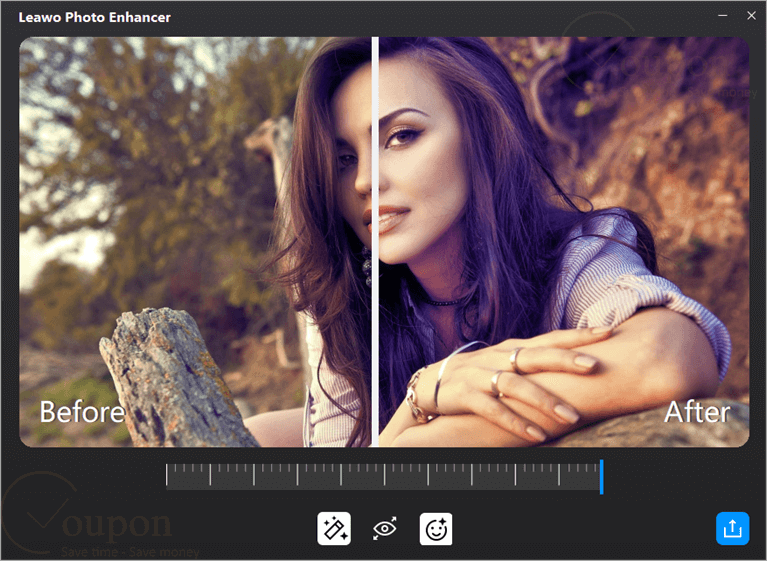
Beyond enhancement, Photoins Photo Enhancer includes smart background removal with options to replace or edit backgrounds, as well as a photo enlarger that upscales images up to 40 times without significant quality loss. Supporting both RAW and JPG formats, it provides fast batch processing powered by AI and hardware acceleration. With a user-friendly interface, Leawo Photoins Photo Enhancer makes professional-grade photo enhancement accessible to both beginners and experts, saving time while delivering impressive, high-quality results.
Key Features
- Automatically improve quality by adjusting color, exposure, white balance, contrast, saturation, and sharpness.
- Remove blemishes and freckles, brighten and enlarge eyes for natural and flattering results.
- Remove haze and fog and enhance sky details and colors in landscape photos.
- Remove or change photo backgrounds in batch or individually, with manual refinement options.
- Upscale and enlarge images by up to 40 times without significant loss of quality, using deep-learning AI algorithms.
- Enhance, upscale, or edit multiple photos simultaneously for improved productivity.
- Process both RAW and compressed image formats, including fixing lens distortions and reducing JPEG artifacts.
- Designed for simplicity and accessibility, catering to both beginners and professionals.
- Offer both auto enhancement and customizable manual settings for greater control over results.
- Utilize GPU power for faster processing and efficiency.
Pricing and Plans
Pricing & Subscription Options
- 1 Year: Just $17.97 after using coupon code (Regularly $29.95)
- Lifetime: Just $23.97 after using coupon code (Regularly $39.95)
Free Trial & Money-Back Guarantee
- Trial version: PhotoIns provides a free trial version. Users can download and test the full functionality before purchasing, allowing them to evaluate whether it fits their needs.
- Money-Back Guarantee: Leawo offers a money-back guarantee for subscriptions. According to current policy, a 5-day money-back window is available for the 1-year subscription plan. Lifetime plans typically have a similar or even longer guarantee period; however, please check the latest specifics on the site or during checkout.
Auto-Renewal & Cancellation
- Auto-Renewal: When purchasing a 1-year license, auto-renewal may be enabled by default.
- Cancellation: For subscriptions (1-Year license), cancel auto-renewal via the payment platform.
Discount Coupon Codes
- Verified coupon codes are available, offering up to 40% off on certain plans.
- These coupon codes are time-limited and subject to change, so please check the provider’s site for the latest offers.
Frequently Asked Questions
Which platforms does PhotoIns support?
PhotoIns is available for Windows (Win 7/8/10/11) and macOS. Hardware requirements include 4GB of RAM, OpenGL 3.3-compatible graphics, an Intel/AMD CPU, and an internet connection for license validation.
How does the free trial of PhotoIns work?
The free trial offers full access to features but limits output to one photo at a time with a watermark. Batch output and watermark removal are available in the registered (paid) version.
How do I activate my PhotoIns license?
After purchase, enter your license code in the registration window of PhotoIns. Internet access is required for activation. License codes are sent by email after purchase.
Can PhotoIns process RAW files and JPEGs?
Yes, PhotoIns supports both RAW and JPEG formats. It includes lens correction and artifact reduction for compressed images.
What is the largest enlargement possible with PhotoIns?
The AI photo enlarger module can upscale images by up to 40 times without significant loss of quality, thanks to deep learning technology.
Where can I find discount codes or coupon offers?
PhotoIns offers regular discounts directly on the official site, often up to 50% off. You can also get a 40% off coupon code from trusted partners like Tickcoupon. For example, use the code LEAWO***SL40OFF at checkout on partner sites to receive 40% off.
Technical Specifications
| Requirement | Windows | macOS |
|---|---|---|
| Operating System | Windows 7, 8, 8.1, 10, 11 (64-bit) | macOS Yosemite (10.10) to macOS Sequoia (15) |
| Processor | Intel Core i3 or AMD Athlon 64, 2GHz or faster | 1GHz or above Intel processor or Apple M1/M2 chip (Rosetta required) |
| RAM | 4GB (8GB or more recommended) | 4GB (8GB or more recommended) |
| Disk Space | 4GB available (SSD recommended for better performance) | 4GB available (SSD recommended for better performance) |
| Graphics | OpenGL 3.3+ compatible graphics card, DirectX 10 adapter | OpenGL 3.3+ compatible graphics card |
| Screen Resolution | 1024×768 (1280×800 or better recommended) | 1440×900 (1920×1080 or better recommended) |
| Internet | Required for installation, activation, subscription validation, and online services | Required for installation, activation, subscription validation, and online services |
| Languages Supported | English, Simplified Chinese, French, Japanese, German | English, Simplified Chinese, French, Japanese, German |
| Installation Type | Online installer, Standalone application | Online installer, Standalone application |