76% Off IObit Protected Folder Coupon & Review 2026
IObit Protected Folder is a smart and convenient way to protect your important files and data from loss, theft, hacking, and leaks.

IObit Protected Folder Coupon Codes Oct 2026
Keep your eyes on the IObit Protected Folder discount code to enjoy a 75% discount on Protected Folder (1-year subscription) at checkout. Be quick to grab this code and save it now!


Table of Contents
Why choose IObit Protected Folder?
If you are looking for software to protect your privacy and prevent data theft, data loss, or leakage of personal information, IObit Protected Folder is an ideal choice for individual users. It is specialized software that helps protect sensitive folders and files from others by a password; it will lock the contents on your computer, which can be accessed only by you.
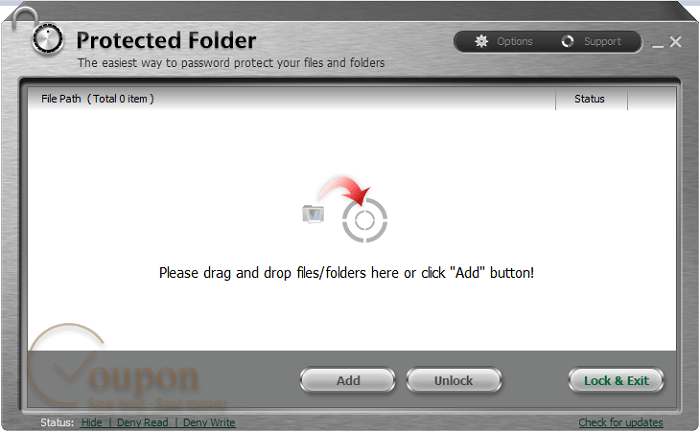
IObit Protected Folder will hide folders and files using advanced algorithms and open only those folders with the password you create. You can feel secure because your folder will be protected in a safe and virus-free manner.
Key Features
- Your data is totally safe and cannot be accessed by any hacker.
- Automatically hide protected data as if it had never existed. Others will not be able to find or know the existence of this data.
- Keep files visible but still manage user rights.
- Deny read and write access, which activates the protection mechanism, and do not allow others to read, delete, move, or change the contents of the protected file/folder.
- The software supports multiple languages (approximately 5 languages).
- The application has an eye-catching, convenient, and easy-to-use interface.
Pricing and Plans
Pricing & Subscription Options
- 1 Year/1 PC: ONLY $9.97 after using coupon code (Regularly $39.95)
Free Trial and Money-Back Guarantee
- IObit Protected Folder offers a free trial with 20 uses. After the trial ends, you need to purchase a license to continue using the product.
- IObit provides a 60-day money-back guarantee. If you are not satisfied with the product, you may request a refund within 60 days of purchase, provided you meet the accepted circumstances outlined in their refund policy.
Auto-Renewal and Cancellation
- Subscriptions are typically set to auto-renew by default. When you renew, your current subscription is automatically extended for another 12 months, and you retain your current license code.
- To cancel auto-renewal, please get in touch with IObit support or manage your subscription settings. Once auto-renew is disabled, your license will not renew automatically in the future.
- If you are charged for an auto-renewal you did not want and did not receive a renewal reminder, you may be eligible for a refund under IObit’s money-back guarantee.
Discount Coupon Codes
- Discount codes for IObit Protected Folder are widely available, often providing 50%–75% off the regular price.
Frequently Asked Questions
What is IObit Protected Folder?
IObit Protected Folder is a security tool for Windows that allows you to password-protect, hide, and block access to your files and folders, safeguarding them from unauthorized access, accidental deletion, and malware attacks.
How does IObit Protected Folder protect my data?
It uses password protection, hiding, and access restriction features to ensure that only authorized users can view or modify protected files and folders.
Which operating systems are supported?
IObit Protected Folder supports Windows 11, 10, 8.1, 8, 7, Vista, XP, and 2000.
How do I set up file and folder protection?
After installing the software, set a master password. Then, drag and drop files or folders into the program or use the “Add” button to protect them.
What happens if I forget my password?
You can set a password hint during the setup process. If you forget your password and have not set a hint, recovery options may be limited, so it’s crucial to remember your password.
Can I change my password after I’ve set it?
Yes, you can change the password in the Options menu within the program.
Are there any discount coupon codes available?
Yes, discount codes are widely available. For example, Tickcoupon offers up to 75% off on IObit products, including Protected Folder, during special promotions. Use the provided coupon code at checkout to receive the discount.