5% Off Smart Extrude – 3Ds Max Modifier Plugin Coupon Oct 2026
Smart Extrude is a new 3D Max Modifier that ensures the predictable extrusion of multi-spline shapes, adjusting to their placement across different planes or orientations at various angles.

Smart Extrude – 3Ds Max Modifier Plugin Coupon Code
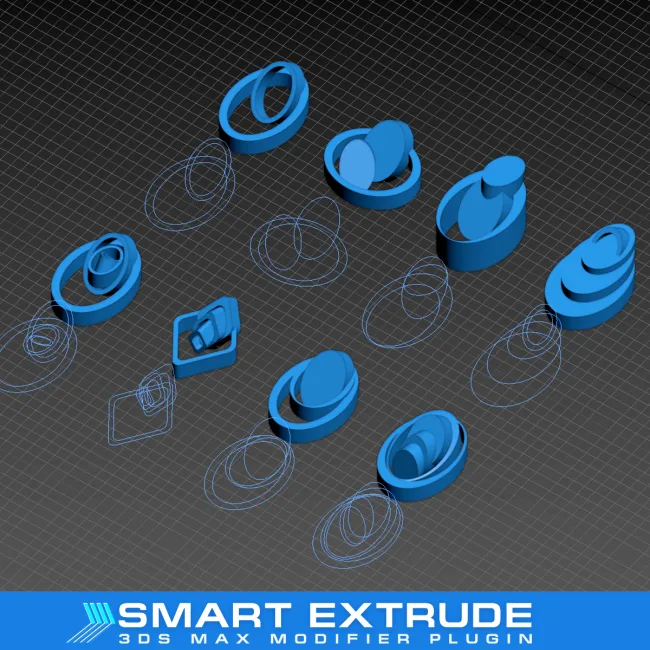
Table of Contents
How to use the coupon code?
- Tap the “Copy Code” button to proceed to the checkout page.
- Paste the coupon code during checkout to redeem your discount (or observe your applied discount if the coupon code is already integrated).
- Fill in your billing details and choose your preferred payment method to finalize your order.
- Enjoy your purchase!

Smart Extrude – 3Ds Max Modifier Plugin Intro and Features
Smart Extrude – 3Ds Max Modifier Plugin is an advanced modifier plugin that was born for 3ds Max users, offering a robust solution for extruding faces and shapes predictably and efficiently. It allows users to interactively extrude by simply holding Shift and dragging in the viewport. The plugin features automatic stitching, rebuilding, and stitching faces affected by cut-throughs or overlaps to ensure a watertight mesh without manual adjustments. Users can extrude shapes from the center on both sides of the spline and fine-tune the extrusion angle to meet specific design needs. Additional features include creating flat surfaces at extrusion points, applying smoothing for polished shapes, managing material IDs for detailed texturing, and controlling real-world mapping coordinates for texture scaling.

Key features:
- Ensure predictable extrusion for multi-spline objects across any plane or angle, unlike the standard Extrude modifier.
- Extrude bidirectionally using “From Center” mode simultaneously.
- Rotate independently with X/Y parameters for precise alignment.
- Cap starts/ends with customizable options and dedicated Material IDs.
- Support automatic mapping coordinates, real-world texture scaling, and shape-based Material IDs.
- Align automatically to the spline direction for natural flow.
- Adjust segments, smoothing groups, and extrusion amount.
- Work with 3ds Max 2017-2026, including splines from Spline Flow.
Refund and Money Back Guarantee Policy
3D Kstudio offers a refund policy within two weeks of purchase if you are not satisfied with the plugin or are unable to use it for any reason.
Support and Contact
- Tickcoupon Support Team: Please send an email to contact@tickcoupon.com if you can’t use the coupon code/deal/giveaway on our website.
- Contact Team: Please send your support queries to: support@3d-kstudio.com
Other Special Discounts
- Education/Nonprofit Discount: This brand provides a 50% educational discount on plugins.
- Volume Discount: This brand offers up to 5% discount for 2 licenses or more.
- Giveaways and Free Keys: Currently, there are no giveaways or free license keys available for the software.
Why choose Tickcoupon?
- Exclusive Discounts: Get up to 98% off with verified coupon codes.
- Wide Selection: Thousands of software deals across all categories.
- Verified & Updated: Every code is tested and regularly updated.
- Trusted Brands: Partnered with top software developers worldwide.
- Easy to Use: Find, copy, and save with just a click.
- Secure Shopping: Shop confidently with trusted, verified deals and safe links.