
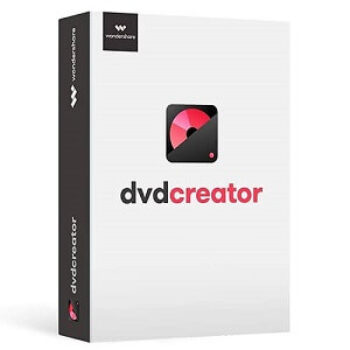
10% Off Wondershare DVD Creator Coupon & Review 2026
Wondershare DVD Creator is a comprehensive DVD, Blu-ray, and CD burning software that allows users to burn videos, photos, and music to discs, create slideshows, and customize DVD menus with ease.

Wondershare DVD Creator Coupon Code
You can take 10% off for Wondershare DVD Creator today if you use the Wondershare DVD Creator coupon code. Never miss out! This code can be used more than once!
for Windows:

for Mac:
Table of Contents
What is Wondershare DVD Creator?
Wondershare DVD Creator continues to be a leading solution for burning DVDs, Blu-ray discs, and CDs, offering a robust set of features for both beginners and advanced users. It offers over 100 free static and dynamic DVD menu templates in various themes. Users can personalise background images, music, titles, and thumbnails. Not to mention, the software includes tools for trimming, cropping, rotating, adjusting brightness/contrast/saturation, adding subtitles, watermarks, and applying special effects.

It also allows users to burn files to data discs for backup, burn ISO files to DVD, and copy DVDs to ISO or DVD folders directly. Wondershare DVD Creator supports over 150 video formats (including MP4, AVI, MKV, MOV, FLV, WMV, MPG, VOB, and more), as well as a range of audio and image formats (JPG, PNG, GIF, TIFF, HEIC, etc.)
Key Features
- Supports over 150 video formats (MP4, AVI, MKV, MOV, FLV, WMV, MPG, VOB, etc.)
- Burns to a wide range of disc types: DVD-9, DVD-5, DVD-R/RW, DVD+R/RW, DVD+R DL, DVD-R DL, DVD-RAM, BD-R, BD-RE, BD-25, BD-50, BD-100
- Blu-ray disc burning (Windows only)
- Offers 100+ static and dynamic DVD menu templates with customizable backgrounds, music, titles, and thumbnails
- Built-in video editor for trimming, cropping, rotating, adjusting brightness/contrast/saturation, adding subtitles and watermarks, and applying effects
- Creates photo slideshows with music and transition effects
- Burns files to data discs for backup
- Supports creating and burning ISO files, and copying DVDs to ISO or DVD folders
- Fast and stable burning performance
- User-friendly and intuitive interface suitable for all experience levels
Pricing and Plans
Free Trial & Money-Back Guarantee
- Free Trial: Available for both Windows and Mac. The trial version has limitations such as watermarks on output, limited menu templates, and some features restricted or with ads.
- Money-Back Guarantee: Wondershare offers a 30-day money-back guarantee for most products, including DVD Creator. Refunds are approved under accepted circumstances within this period.
Auto-Renewal & Cancellation
- Auto-Renewal: The 1-year subscription plan is set to auto-renew by default. You can cancel auto-renewal at any time.
- How to Cancel:
Discount Coupon Codes
- Coupon Codes: Tickcoupon and other coupon sites often provide codes for up to 10% off or more.
Frequently Asked Questions
Which operating systems does Wondershare DVD Creator support?
The software is available for Windows (XP, Vista, 7, 8, 10) and macOS (10.10 Yosemite and later). Note that Blu-ray burning is only supported on Windows.
What video and image formats are supported?
It supports over 150 video formats, including MP4, AVI, MKV, MOV, FLV, WMV, MPG, VOB, and popular image formats like JPG, PNG, GIF, TIFF, and HEIC.
Can I burn Blu-ray discs with Wondershare DVD Creator?
Yes, but Blu-ray burning is only available on the Windows version. The Mac version does not support Blu-ray discs.
Does Wondershare DVD Creator offer a free trial?
Yes, a free trial is available for both Windows and Mac. The trial version has some limitations, such as watermarks on output and restricted menu templates.
How do I cancel auto-renewal for my subscription?
Log into your Wondershare Account Center, go to “Plan & Products,” select “Manage Subscription,” and follow the prompts to cancel auto-renewal
Can I use coupon codes to get a discount?
Yes! Coupon codes are widely available and can provide up to 10% off or more. For example, Tickcoupon and other reputable sites regularly offer 10% off codes for Wondershare DVD Creator. Enter the code at checkout to apply the discount.
Technical Specifications
| Requirement | Windows | Mac |
|---|---|---|
| Operating System | Windows 10/8/7/Vista/XP | macOS X 10.10 (Yosemite) and later |
| Processor | 750 MHz Intel or AMD CPU or higher | 1 GHz Intel processor or higher |
| RAM | 256 MB or above (512 MB recommended) | 512 MB or above |
| Disk Space | 100 MB free for installation (200 MB recommended) | 100 MB free for installation (200 MB recommended) |
| Internet | Required for registration and updates | Required for registration and updates |
| Languages Supported | Multiple languages including English, German, Spanish, French, Italian, Portuguese, Japanese, Korean, Simplified Chinese | Multiple languages including English, German, Spanish, French, Italian, Portuguese, Japanese, Korean, Simplified Chinese |
| Installation Type | Standard Windows installer | Standard Mac installer |


Wondershare DVD Creator Decrypt some things on your PC, now watch them on DVD. You need to make your home movies. Or maybe sooner or later you want to burn this series of movies on your computer to DVD.